Free UX Audit
Talk to us
Web Design
Ui/UX
AI-Driven Prototyping: Transform Sketches into Interactive Mockups
7 Mins Read

The Death of Static Design
Prototypes are simulations of the real product and are used for testing the product. Prototypes are an integral part of any design stage in the product development process. They represent the look and feel of the design, check flaws, usability, and even refine it if further improvements are needed. They are generally referred to as “first drafts” that a designer shares with the team and the client, and hence can’t be overlooked. Not only that, but they also bridge the gap between the idea and the look and feel of the final product, allowing designers to test and refine how the final product will ultimately turn out.
Gone are the days when designers used traditional prototyping to build a product. Traditional prototypes are made by using static screens put together. The main problem designers faced with traditional prototyping was how time-consuming it used to be, and with multiple projects, it became stressful for a designer to follow the timeline. A designer had to spend a lot of time preparing a wireframe and scrap it if it was unapproved. Now, with the integration of AI, everything has become quicker and better. In this article, we will talk about how AI has changed the prototyping world. So, let's get right into it.
The Core Workflow: The Three Stages of AI Transformation
The AI-powered prototyping is much better than traditional prototyping in many ways. AI helps in accelerating the prototyping process by developing mockups and creating interactive flows from text prompts, improving cost reduction, speed, and collaboration. Let’s go through the steps one by one to have a deeper understanding of the working process of stages — from sketch to prototyping.
Stage 1: Idea to Wireframe (Low-Fidelity)
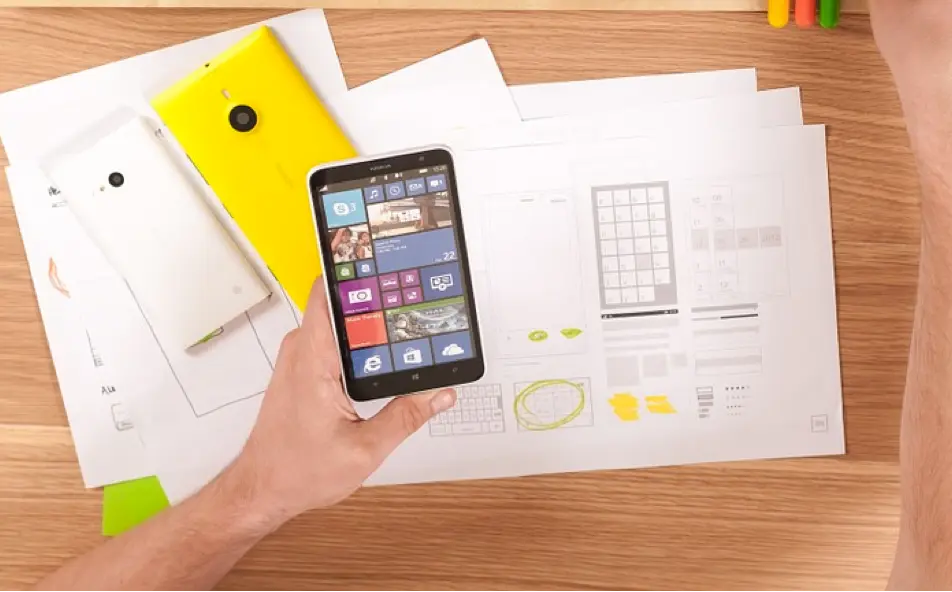
Every idea starts with a sketch. It can be done on paper, on a tablet, or on a computer. That’s where the concept is developed, and the first rough draft of the vision takes shape. Most of the thinking and research is done in this step. Designers don’t need to think about the minor nuances of the design at this stage, as it is just basic, grayscale, blueprint-like sketches that act as placeholders for images and text of a web page or app interface. Tools that can be used to create low fidelity wireframe are paper sketches, Figma (low-fidelity mode), Balsamiq, and Whimsical.
Stage 2: Wireframe to Interactive Mockup (Mid-Fidelity)
Visual details are added to the product in this step. Design elements like colors, typography, and spacing, as well as interactive elements like clicks, transitions, and color and font, are added in this step. It validates the flow and usability of the website or app. The output is a mid-fidelity interactive mockup that isn’t coded yet. The best tools to create Mid-fidelity wireframes are Figma, Adobe XD, Sketch, InVision, Proto.io, and Axure RP.
Stage 3: Mockup to Code (High-Fidelity/MVP)
The step that follows the mid-fidelity wireframe is to turn that into a polished high-fidelity mockup and then into functional software using coding languages and frameworks. Now with the integration of AI, there are many low-code and no-code tools that can be used to turn mockups into fully functional websites or apps with little to no coding language. Tools like Frame, Zeplin, UXPin, and Webflow are some of the tools that can be used. These tools assist in automating the regular workflow, making the process faster, seamless, and cost-efficient.
Competitive Analysis: Top 5 AI Prototyping Tools Compared
A few key benefits of AI-powered AI tools are improved accuracy, enhanced speed, and increased scalability. There are a plethora of options in the market, offering a myriad of benefits. So, how do you decide which is the best for your work? To help you out, we have tested and compared numerous tools to come up with a list of the top 5 tools worth investing in.
Figma: Figma is one of the most versatile tools used by designers to create low-fidelity, high-fidelity wireframes and everything in between. It offers features that assist designers in unleashing their creativity and generating intelligent designs. Additionally, the integration of AI tools has further extended its design capabilities. But the best feature is the collaboration, which can be accessed by different teams at the same time, making it a team-friendly must-have tool for a cross-collaborative team.
Protopie: Another no-code interactive prototyping tool for designers is ProtoPie. It allows designers to create interactive, high-fidelity prototypes for digital products without coding. It offers input methods like voice and touch, making it easier for designers to create advanced interactive prototypes with less effort.
Sketch: Sketch is a macOS-based vector graphic editor tool. It is used for creating wireframes and high-fidelity mockups. The vectors are easily scalable, giving designers a lot to explore. Designers can utilize plug-ins to offer extended functionality according to their needs. For designers who have used Adobe tools before, transitioning to this will be easy as it is similar to them.
Hostinger horizons: This AI website generator tool is perfect for entrepreneurs and creators who don’t have coding knowledge. You can chat with AI and build your own apps quickly and efficiently.
AnotherWrapper: AnotherWrapper is another AI tool that helps you turn your ideas into reality. Its core features and capabilities allow you to build and launch a fully functional app with just a few clicks.
Strategic Advantages & Overcoming Pitfalls
There are certain advantages and pitfalls when it comes to AI prototyping. They include:
4.1. The Strategic Value (Why AI Wins): AI prototyping provides several strategic advantages, including faster design, efficient resource allocation, and a competitive edge. Additionally, the rapid iteration process allows designers to explore more options and create better designs. The pitfalls are poor data quality, misaligned project objectives, and security risks. Setting clear goals and overcoming these pitfalls will be crucial for designers as time moves forward.
The New Challenges (The Human Element):It goes without saying that designers need to balance automation with human oversight when building scalable systems. Remember not to rely too heavily on the tools, as they might not generate the desired output. Another important consideration is data sensitivity and privacy, ensuring sufficient transparency about how the data is handled.
Bottom line: The Future is Interactive
That’s all we have for you. AI is evolving! As AI continues to expand, we will see new tools sprouting up in the UX space for the objective of assisting designers in working efficiently and creatively. For anyone who is looking to become a versatile designer, they must know how to integrate AI into workflows. It can be used to automate repetitive tasks and streamline the entire process. AI isn't destroying creativity, but enhancing it.
The sooner we embrace the technology, the better the storytelling will be. If you’re a new designer figuring out the path, AI can be your friend if used strategically. We hope this article was able to provide you with exactly the kind of value you’re looking for. Want to learn more about new tools and technology in the UX space? Follow us.
Newsletter
Enjoyed this read? Subscribe.
Discover design insights, project updates, and tips to elevate your work straight to your inbox.
Unsubscribe at any time